Try it out
You can drive SPECA from the CLI, the Web UI, or any of the multi-runtime backends (Codex / Gemini / Ollama / Copilot in addition to Claude). The Web UI is the easiest first run — it bundles the runtime picker and the run wizard, plus per-error guidance.
Each step lists "what to check if it fails" inline.
Prerequisites
| Item | Required |
|---|---|
| Node.js | ≥ 20 |
| Python | 3.12 (we recommend uv) |
| git | any |
| OS | Windows 11 / macOS 14 / Ubuntu 22.04 verified |
| Auth | one of: claude.ai subscription (Pro/Max) / ANTHROPIC_API_KEY / OPENAI_API_KEY / GEMINI_API_KEY / Ollama (self-hosted is free) |
Sanity-check:
node --version    # v20+
uv --version      # 0.6+
git --version
Route A — Drive an audit from the Web UI (recommended)
1. Clone + install deps
git clone https://github.com/NyxFoundation/speca.git
cd speca

uv sync                          # Python deps
cd web/frontend && npm install   # Frontend deps
cd ../..
If something breaks:
uv syncerrors → confirmpython -Vreports 3.12; otherwiseuv python install 3.12npm installerrors →node -vbelow v20?nvm install 20 && nvm use 20- Windows + bash-style
&¬ working → PowerShell usescd web\frontend; npm install; cd ..\..
2. Log into Claude (the supported default)
npm install -g @anthropic-ai/claude-code
claude auth login        # opens claude.ai OAuth in the browser
Check:
claude auth status --json
# → { "loggedIn": true, "authMethod": "claude.ai", "email": "...", "subscriptionType": "max" }
Or pick a different auth source (API key or OAuth):
# --- Anthropic ---
# OAuth (Pro/Max subscription)
claude auth login
# Or API key
export ANTHROPIC_API_KEY=sk-ant-api-...

# --- OpenAI Codex ---
# OAuth (ChatGPT plan)
npm install -g @openai/codex
codex login
# Or API key via the CLI
printenv OPENAI_API_KEY | codex login --with-api-key
# Or just export it (audit pipeline path)
export OPENAI_API_KEY=sk-...

# --- Google Gemini ---
# API key (simplest)
export GEMINI_API_KEY=...                     # https://aistudio.google.com/apikey
# Or Google OAuth (Application Default Credentials)
gcloud auth application-default login
export GOOGLE_GENAI_USE_GCA=true

# --- Ollama (no OAuth) ---
# Self-hosted (no auth)
ollama serve   # in another terminal
export OLLAMA_HOST=http://localhost:11434
# Cloud (API key)
export OLLAMA_HOST=https://ollama.com
export OLLAMA_API_KEY=...

# --- GitHub Copilot (chat only, audit unsupported) ---
gh auth login                                  # GitHub OAuth
gh extension install github/gh-copilot
:::tip OAuth vs API key
- OAuth rides your subscription (Pro/Max plan, ChatGPT plan, Google personal account, GitHub login). The CLI manages tokens for you.
- API key is pay-per-use. Better for CI / scripts.
/diagnosticsand--list-runtimesboth surface which path is currently usable. :::
3. Start the Web server
uv run speca-web --port 7411 --host 127.0.0.1 --serve-frontend
Expected log:
INFO:     Started server process [...]
INFO:     Application startup complete.
INFO:     Uvicorn running on http://0.0.0.0:7411
Open http://127.0.0.1:7411/ in a browser:
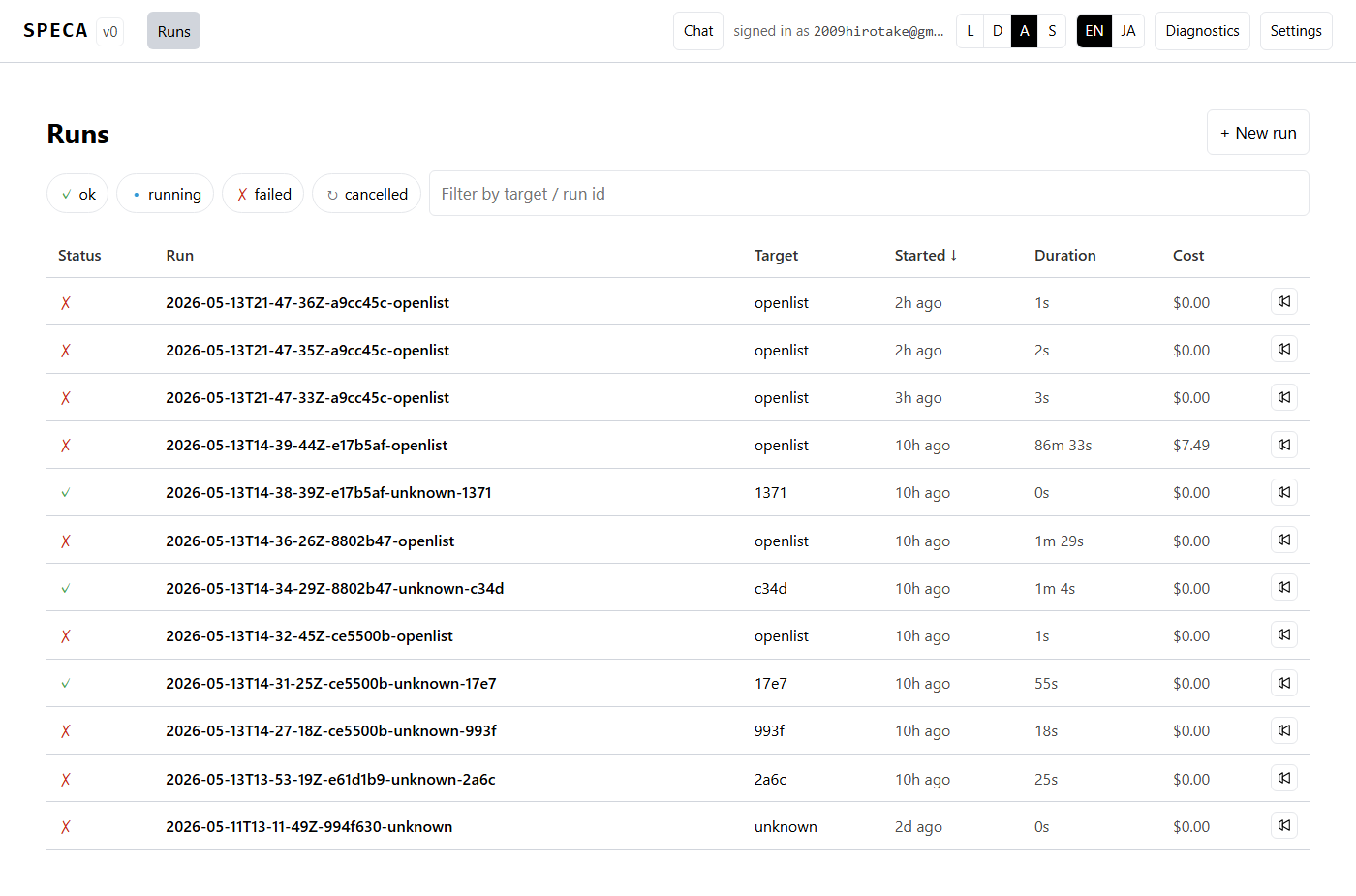
If something breaks:
- Port in use →
--port 8000etc. claude auth statuspasses but Web UI showslogged_in: false→ credentials path mismatch. Checkls ~/.claude/.credentials.json(note the leading dot)- Browser cannot connect → firewall.
--host 0.0.0.0to expose, or check loopback with127.0.0.1
4. (Optional) Try a different runtime
/settings exposes a Chat runtime section:
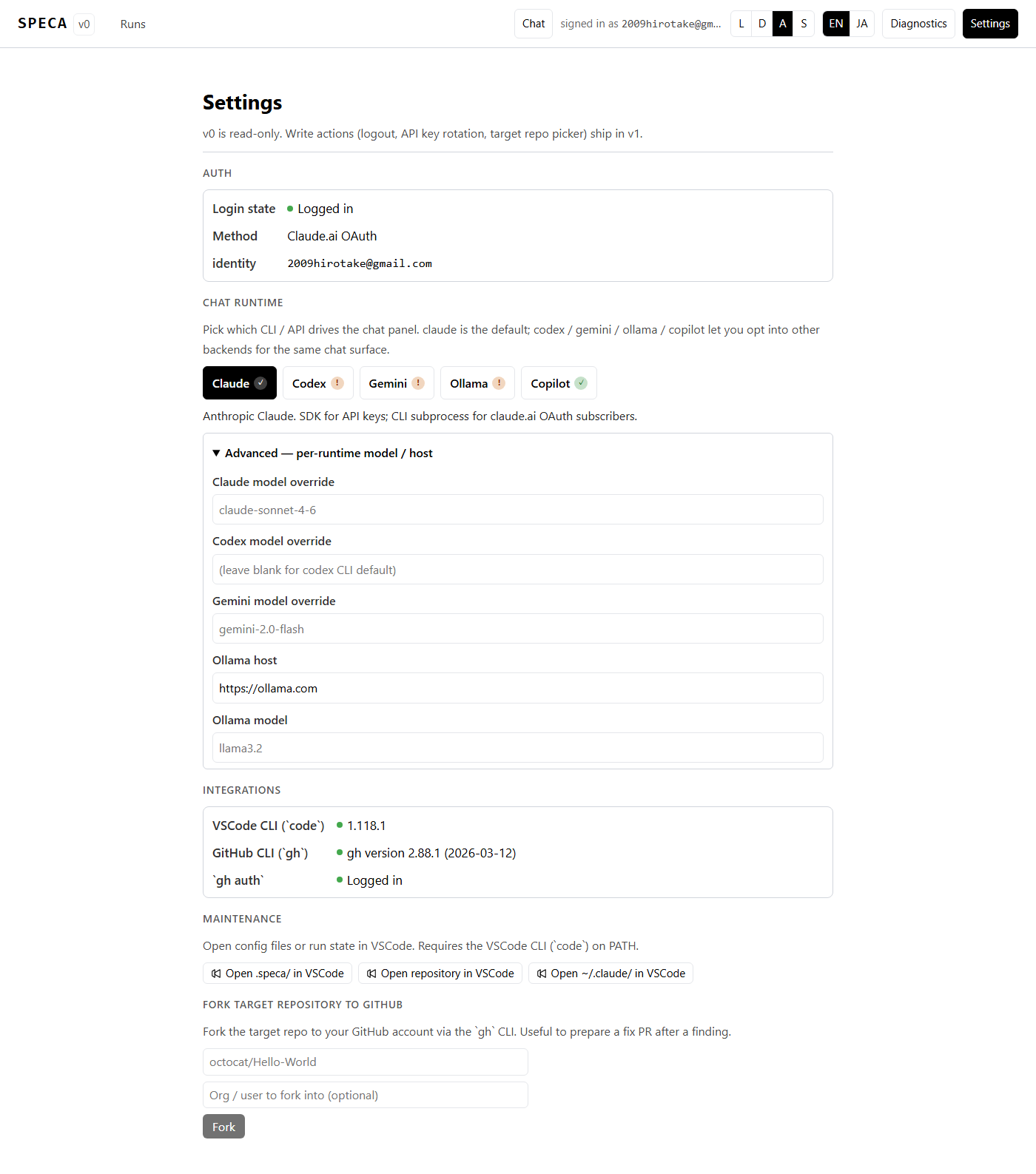
| Runtime | OAuth | API key | What the server needs |
|---|---|---|---|
| Claude | claude auth login | ANTHROPIC_API_KEY | Default — nothing extra |
| Codex | codex login (ChatGPT plan) | OPENAI_API_KEY | CLI logged in, or OPENAI_API_KEY exported |
| Gemini | gcloud auth application-default login + GOOGLE_GENAI_USE_GCA=true | GEMINI_API_KEY | Either path exported in the server env |
| Ollama | — (no OAuth) | cloud: OLLAMA_API_KEY, self-hosted: none | Set OLLAMA_HOST (default cloud) |
| Copilot | gh auth login (GitHub OAuth) | — (subscription required) | Chat only; orchestrator is unsupported |
The ✓ / ! badge reflects "what the server process sees right now"
— export env vars before starting / restarting the Web server. Full
per-runtime details in
Multi-runtime backends.
5. Start an audit run
Dashboard → + New run → either Picker or Wizard.
Wizard mode (/runs/new/wizard):
- Project type —
smart_contract/web_app/library/other - Target repo —
owner/name(e.g.OpenZeppelin/openzeppelin-contracts) - Target ref — empty for default branch, or
v5.0.0etc. - Scope — Bug bounty URL if any, otherwise leave empty
- Spec URLs — optional (Phase 01a seed)
- Confirm — Launch
Failure cases:
| Error | Meaning | Manual fix |
|---|---|---|
clone_failed | private repo / typo / network | git ls-remote https://github.com/<owner>/<name> to verify reachability. For private repos export GH_TOKEN then restart |
invalid_target_repo | slug format invalid | Use plain owner/name. No https:// prefix |
ref_not_found | branch/tag missing on origin | git ls-remote --tags --heads <repo> to confirm |
worktree_failed | .speca/workspaces/ corruption | rm -rf .speca/workspaces/<target> to regenerate |
anthropic_unreachable | API outage / auth expired | Re-check claude auth status --json, see status.anthropic.com |
Errors render in a localised modal with suggested action (CLI spec §10.4 — 7 cases covered).
6. Watch the run
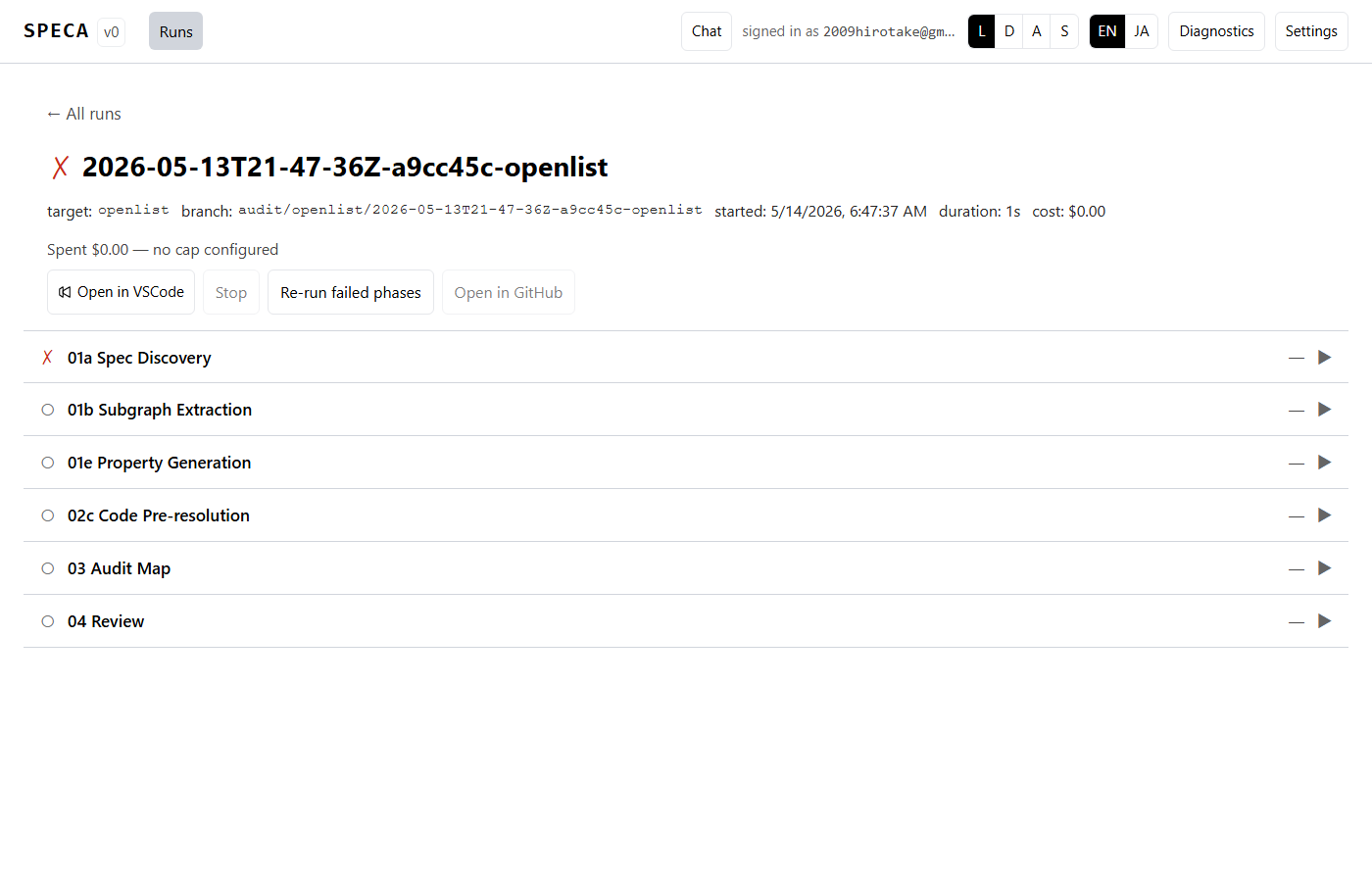
Click each phase to expand, or Tab-focus a row and press l to open
the log pane. f force re-runs one phase.
Budget exceeded: click the gauge to open the cap-bump modal:
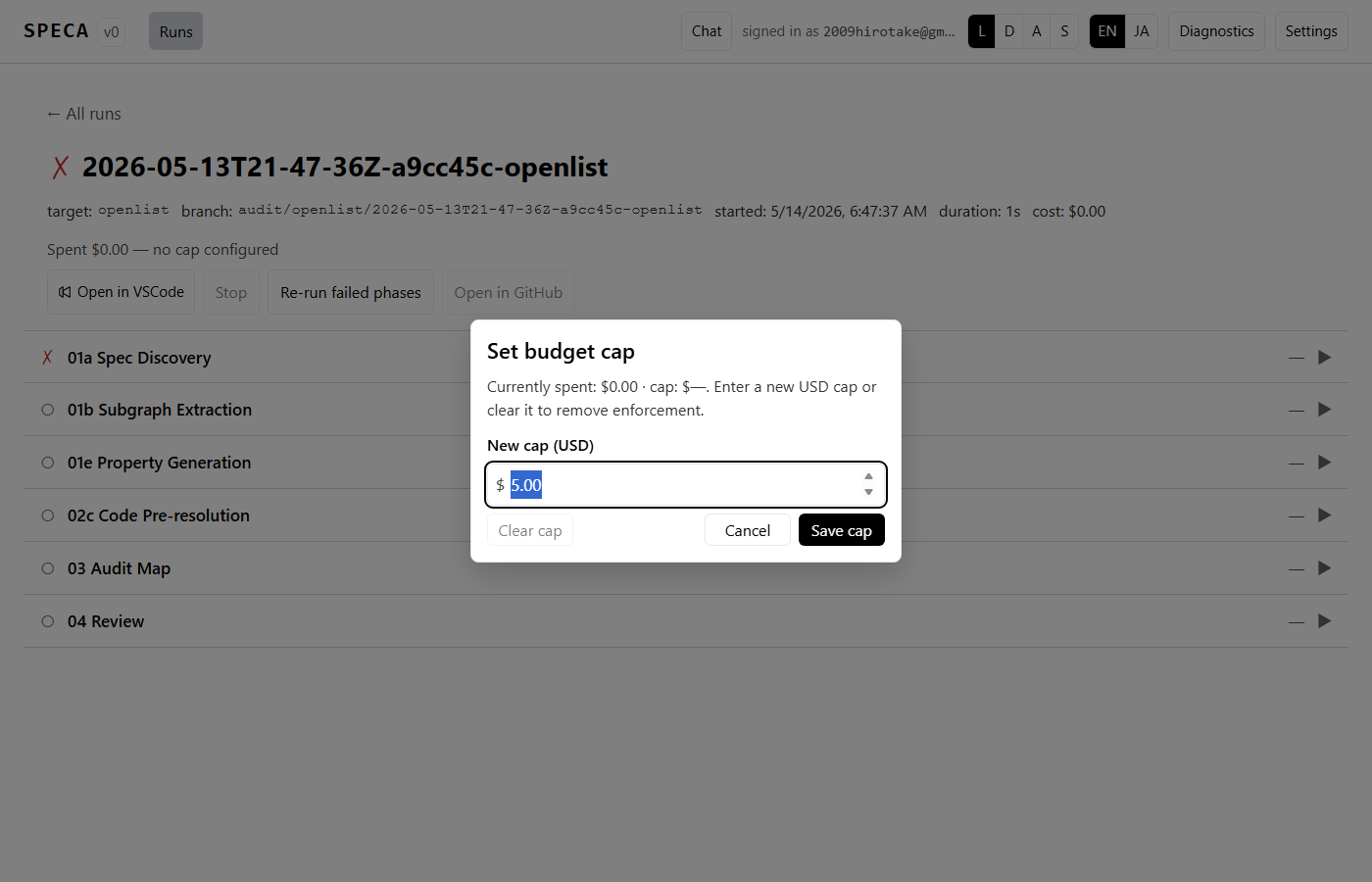
7. Browse findings
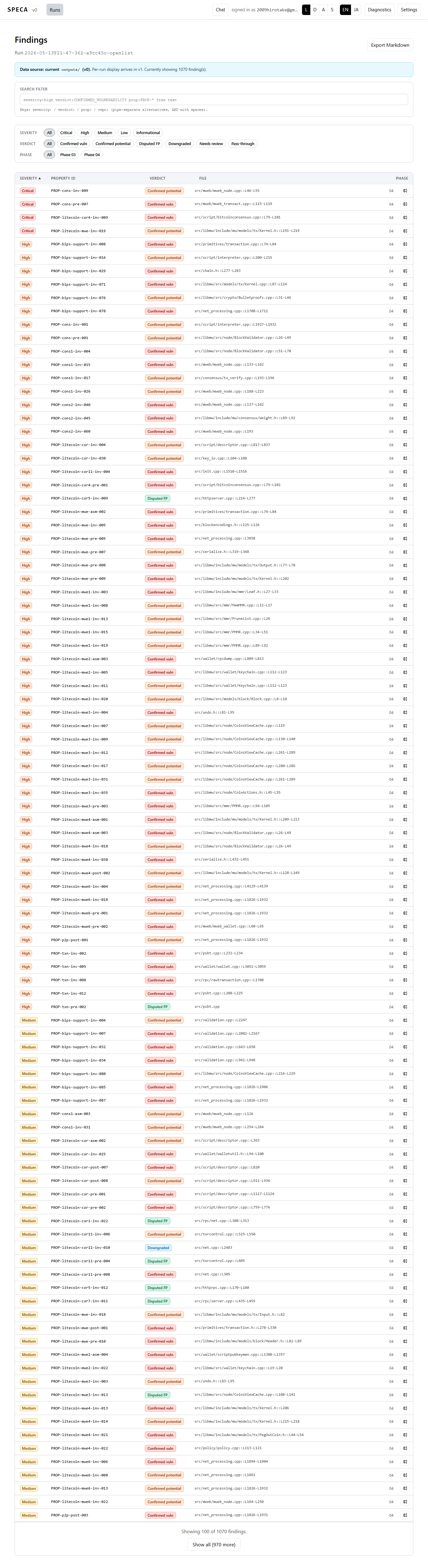
Filter via DSL:
severity:HIGH|CRITICAL verdict:CONFIRMED_VULNERABILITY path:contracts/**/*.sol
Or deep-link with ?glob=:
http://127.0.0.1:7411/runs/<id>/findings?glob=contracts/**/*.sol
Row click → detail page with Prism code highlighting:
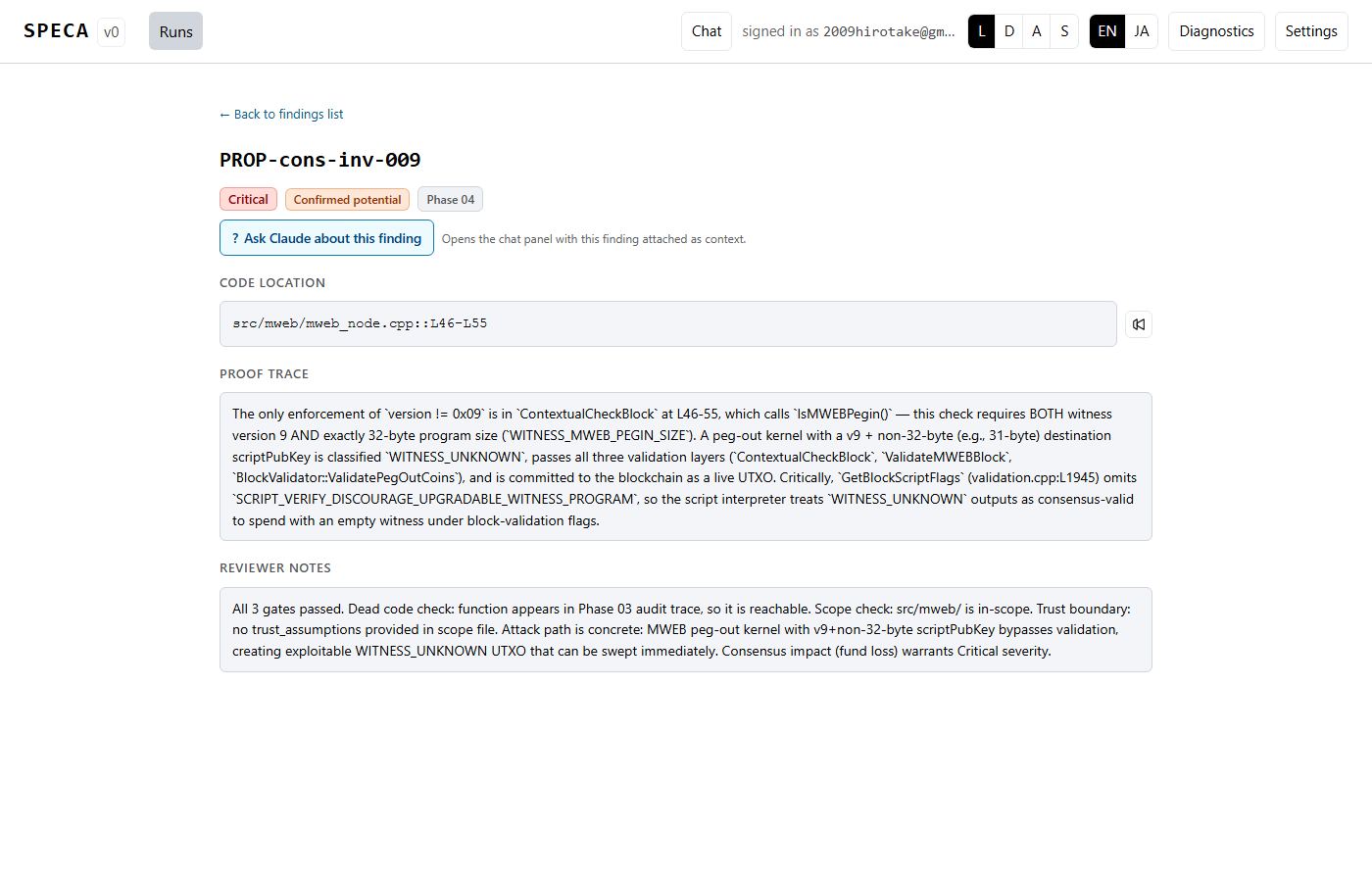
"Ask Claude about this finding" injects the finding into the chat panel as context.
8. (Optional) Markdown export
The Export Markdown button on the findings list produces a severity-bucketed one-file report. Good starter material for a bug bounty submission or internal review.
Route B — Run an audit from the CLI (CI / scripts / fine control)
Use this route when you want to skip the Web UI entirely (CI, scripted
batches) or need finer control than the wizard surfaces. Same setup
(clone + uv sync) as Route A.
B-1. Preflight
# Python / Node / git / claude CLI / MCP server all present?
uv run python -c "import sys; print(sys.version)"
node --version
which claude    # or where claude on Windows
bash scripts/setup_mcp.sh --verify
--verify checks MCP registration. If something is missing, run
bash scripts/setup_mcp.sh (no flag) to re-register.
B-2. Write target info
The CLI route is straightforward: hand-write the two JSON files the pipeline expects.
mkdir -p outputs
{
  "repository": "OpenZeppelin/openzeppelin-contracts",
  "ref": "v5.0.0",
  "project_type": "smart_contract"
}
{
  "url": "https://www.immunefi.com/bounty/openzeppelin",
  "scope_summary": "Core ERC-20/721 + access control contracts",
  "in_scope_assets": [
    "contracts/access/Ownable.sol",
    "contracts/access/AccessControl.sol",
    "contracts/token/ERC20/**/*.sol"
  ],
  "spec_urls": [
    "https://docs.openzeppelin.com/contracts/5.x/access-control"
  ]
}
Full schema in Config files. Without these, Phase 01a halts with "Empty results" (Troubleshooting C).
B-3. (Optional) Override Phase 01a env
If you don't bake spec_urls into BUG_BOUNTY_SCOPE.json, you can
pass them via env:
export KEYWORDS="ethereum execution client EIP"
export SPEC_URLS="https://ethereum.github.io/execution-specs/src/,https://geth.ethereum.org/docs"
With neither set, Phase 01a falls back to the built-in Ethereum seed defaults.
B-4. Run the pipeline
Pattern 1: All phases at once
uv run python scripts/run_phase.py --target 04 --workers 4
--target 04 resolves the dependency chain and runs
01a → 01b → 01e → 02c → 03 → 04.
Pattern 2: One phase at a time
uv run python scripts/run_phase.py --phase 01a --workers 4
# → outputs/01a_STATE.json + outputs/01a_PARTIAL_*.json
cat outputs/01a_STATE.json | python -m json.tool | head -30

uv run python scripts/run_phase.py --phase 01b --workers 4
# → outputs/01b_PARTIAL_*.json + outputs/graphs/

uv run python scripts/run_phase.py --phase 01e --workers 4
uv run python scripts/run_phase.py --phase 02c --workers 4
uv run python scripts/run_phase.py --phase 03 --workers 4
uv run python scripts/run_phase.py --phase 04 --workers 4
Pattern 3: Skip a phase
Skip Phase 02c (it depends on MCP tree-sitter, which only the claude runtime drives today):
uv run python scripts/run_phase.py --phase 01a 01b 01e 03 04 --workers 4
Useful flags
--force                    # Ignore resume state and re-execute
--workers 4                # Parallel worker count
--max-concurrent 8         # Max parallel claude invocations per phase
--budget 50                # Cost ceiling in USD (exit 64 when reached)
--output-dir outputs-test  # Separate output directory (parallel runs)
--cleanup-dry-run          # Show what would be re-executed, do not run
--json                     # NDJSON event stream (CI-friendly)
--no-tui                   # Plain text (combines with --json)
--01a-scope primary        # Filter Phase 01a state (PR #65)
--runtime <name>           # Switch runtime (PR #64)
--list-runtimes            # List registered runtimes with availability
B-5. Switch runtimes
# See what's available
uv run python scripts/run_phase.py --list-runtimes
Active runtime: claude
[OK] claude       Anthropic claude CLI (stream-json). ...
[..] api          OpenRouter-style HTTP. - Set API_RUNNER_API_KEY ...
[..] codex        OpenAI Chat API. - Set OPENAI_API_KEY ...
[..] gemini       Google Gemini (OpenAI-compat endpoint). - Set GEMINI_API_KEY ...
[..] ollama       Ollama (/v1/chat/completions). ...
[OK] copilot      GitHub Copilot agentic CLI (`copilot -p --output-format json --allow-all-tools`). Routes through CopilotRunner.
For CI / speca-cli consumers, JSON:
uv run python scripts/run_phase.py --list-runtimes --json | python -m json.tool
Per-runtime examples
# --- Claude (default) — nothing extra
uv run python scripts/run_phase.py --target 04 --workers 4

# --- OpenRouter (generic OpenAI-compatible) ---
export API_RUNNER_API_KEY=sk-or-v1-...
export API_RUNNER_BASE_URL=https://openrouter.ai/api/v1
export API_RUNNER_MODEL=deepseek/deepseek-r1
uv run python scripts/run_phase.py --target 04 --runtime api --workers 4

# --- OpenAI Codex ---
# OAuth (ChatGPT plan)
codex login
# Or API key
export OPENAI_API_KEY=sk-...
uv run python scripts/run_phase.py --target 04 --runtime codex --workers 4
# Custom model
export OPENAI_MODEL=gpt-4-turbo
uv run python scripts/run_phase.py --target 04 --runtime codex

# --- Google Gemini ---
# API key
export GEMINI_API_KEY=...
# Or Google OAuth (ADC)
gcloud auth application-default login
export GOOGLE_GENAI_USE_GCA=true
uv run python scripts/run_phase.py --target 04 --runtime gemini

# --- Ollama self-hosted ---
# Terminal A
ollama serve
ollama pull llama3.2
# Terminal B
export OLLAMA_HOST=http://localhost:11434
uv run python scripts/run_phase.py --target 04 --runtime ollama --workers 2

# --- Ollama cloud ---
export OLLAMA_HOST=https://ollama.com
export OLLAMA_API_KEY=...
uv run python scripts/run_phase.py --target 04 --runtime ollama

# --- GitHub Copilot (agentic CLI, subscription required) ---
npm install -g @github/copilot
copilot                                # First launch performs GitHub OAuth (creds in ~/.copilot)
# Optional: COPILOT_MODEL=claude-sonnet-4-6 to override the CLI's default
uv run python scripts/run_phase.py --target 04 --runtime copilot --workers 2
Full per-runtime auth / env reference is in Multi-runtime backends.
B-6. Tail logs / inspect progress
The TUI dashboard (default) renders phase progress + cost live. To tail detailed logs in another terminal:
# Tail the most recent phase log
tail -f outputs/logs/03_W0B0_*.jsonl | jq .

# Count PARTIALs (progress indicator)
ls -1 outputs/03_PARTIAL_*.json | wc -l

# Read the manifest (useful when resuming after a Ctrl-C)
cat .speca/runs/*/state.json | jq '{run_id, status, current_phase, cost_usd_total}'
B-7. Browse findings
Read PARTIAL files directly
# All findings
ls outputs/04_PARTIAL_*.json
cat outputs/04_PARTIAL_W0B0_*.json | jq '.findings[] | {property_id, severity, verdict, file}'

# Severity filter
cat outputs/04_PARTIAL_*.json | jq '.findings[] | select(.severity=="High")'
speca browse TUI
speca browse
speca browse --severity Critical
speca browse --filter "verdict:CONFIRMED_*"
speca browse --filter "path:contracts/**/*.sol severity:HIGH"
c for code peek, f to edit the filter, q to quit. Full DSL in
the CLI reference.
Markdown export from the CLI
uv run python -c "
from pathlib import Path
import json
findings = []
for p in Path('outputs').glob('04_PARTIAL_*.json'):
    findings.extend(json.loads(p.read_text())['findings'])
findings.sort(key=lambda f: ('Critical High Medium Low Informational'.index(f['severity']), f['property_id']))
for f in findings:
    print(f'## {f[\"property_id\"]} — {f[\"severity\"]} / {f.get(\"verdict\", \"?\")}')
    if f.get('file'): print(f'`{f[\"file\"]}::{f.get(\"line_range\", \"\")}`')
    print()
    print(f.get('evidence_snippet', '_(no snippet)_'))
    print()
" > findings.md
B-8. Ask Claude about one finding
speca ask                                       # pick first finding
speca ask PROP-abc-001 --from outputs/04_PARTIAL_*.json
speca ask --severity High --filter "verdict:CONFIRMED_*"
Opens a Claude Code session with that finding loaded as context — the CLI equivalent of "Ask Claude about this finding" in the Web UI.
B-9. Manual recovery
| Symptom | Check | Fix |
|---|---|---|
| Phase 03 circuit breaker (exit 65) | tail -50 outputs/logs/03_*.jsonl | jq . | Re-run with lower concurrency: --force --workers 2 --max-concurrent 4 |
| One batch is broken | Inspect outputs/<phase>_PARTIAL_W<W>B<B>_*.json | Delete that one file → resume |
| Budget reached (exit 64) | cat .speca/runs/*/state.json | jq .cost_usd_total | --budget 100 or narrow scope |
BUG_BOUNTY_SCOPE.json missing | ls outputs/BUG_BOUNTY_SCOPE.json | Hand-write per B-2 |
outputs/01a_STATE.json empty | cat outputs/01a_STATE.json | Export SPEC_URLS then --phase 01a --force |
| Phase 02c MCP failure | bash scripts/setup_mcp.sh --verify | Re-register MCP, then --phase 02c --force |
# Force re-run just the failed phase
uv run python scripts/run_phase.py --phase 03 --force --workers 4

# Delete one broken batch and resume
rm outputs/03_PARTIAL_W0B5_*.json
uv run python scripts/run_phase.py --phase 03

# Show what cleanup would do before forcing
uv run python scripts/run_phase.py --phase 03 --cleanup-dry-run
The exhaustive recovery procedures live in Troubleshooting.
B-10. CI example (GitHub Actions)
name: Nightly SPECA audit
on:
  schedule: [{ cron: "0 18 * * *" }]   # 03:00 JST nightly
  workflow_dispatch:

jobs:
  audit:
    runs-on: ubuntu-22.04
    timeout-minutes: 180
    steps:
      - uses: actions/checkout@v4
      - uses: actions/setup-node@v4
        with: { node-version: "20" }
      - uses: astral-sh/setup-uv@v3
      - name: install claude CLI
        run: npm install -g @anthropic-ai/claude-code
      - name: install deps
        run: uv sync
      - name: write target info
        run: |
          cat > outputs/TARGET_INFO.json <<EOF
          {"repository":"${{ github.repository }}","ref":"${{ github.sha }}","project_type":"smart_contract"}
          EOF
          cat > outputs/BUG_BOUNTY_SCOPE.json <<EOF
          {"in_scope_assets":["contracts/**/*.sol"],"spec_urls":[]}
          EOF
      - name: speca audit
        env:
          ANTHROPIC_API_KEY: ${{ secrets.ANTHROPIC_API_KEY }}
        run: |
          uv run python scripts/run_phase.py \
            --target 04 \
            --workers 4 \
            --budget 50 \
            --json --no-tui > audit-events.ndjson
      - name: upload artifacts
        if: always()
        uses: actions/upload-artifact@v4
        with:
          name: speca-${{ github.run_id }}
          path: |
            outputs/
            audit-events.ndjson
            .speca/runs/
The --json NDJSON is typed and consumable by speca-cli (issue #3)
or any JS reader.
B-11. Parallel audits
# Terminal A
export SPECA_OUTPUT_DIR=outputs-target1
mkdir -p $SPECA_OUTPUT_DIR
# (place target1's TARGET_INFO.json / BUG_BOUNTY_SCOPE.json under it)
uv run python scripts/run_phase.py --target 04 --output-dir $SPECA_OUTPUT_DIR

# Terminal B
export SPECA_OUTPUT_DIR=outputs-target2
# (likewise)
uv run python scripts/run_phase.py --target 04 --output-dir $SPECA_OUTPUT_DIR
SPECA_OUTPUT_DIR (env) and --output-dir (flag) are equivalent.
Watch the Claude subscription parallel quota
(Troubleshooting B).
Reading the CLI TUI
SPECA · openzeppelin-ownable-walkthrough          cost: $1.42 / $50 budget
─────────────────────────────────────────────────────────────────────────
01a Spec Discovery     ████████████████████  done   23 sections   $0.18
01b Subgraph Extract   ████████████████████  done   12 subgraphs  $0.24
01e Property Gen       ████████████████████  done   18 props      $0.31
02c Code Resolution    ████████░░░░░░░░░░░░  3 / 18 workers=4    $0.21
03 Audit Map           ░░░░░░░░░░░░░░░░░░░░  pending             —
04 Review              ░░░░░░░░░░░░░░░░░░░░  pending             —
Phase semantics → Pipeline overview.
Cost & wall-time estimates
| Codebase | Wall time | Cost (Sonnet 4.5) |
|---|---|---|
| Small contract (~1K LoC) | 5–10 min | $1–5 |
| Mid-size repo (~50K LoC) | 15–40 min | $20–50 |
| Production client (~500K LoC) | 1–3 hours | $50–100 |
| Runtime | Relative cost | Speed | Audit accuracy |
|---|---|---|---|
| Claude (Sonnet 4.5) | baseline | baseline | ★★★ |
| Claude Pro/Max OAuth | 0 (subscription) | baseline | ★★★ |
| Codex (GPT-4o) | ≈0.5x | baseline | ★★☆ |
| Gemini (2.0 Flash) | ≈0.3x | ★1.5x faster | ★★☆ |
| Ollama (self-hosted llama3.2:70b) | 0 (local) | ★0.3x slower | ★☆☆ |
Cost discussion → Model selection design notes.
Quick troubleshooting
Long-form on the Troubleshooting page. Quick "try this first":
Phase 01a "Empty results"
outputs/BUG_BOUNTY_SCOPE.json missing / in_scope empty. Re-run the
wizard or hand-edit it. Format in config files.
Exit code 64 / 65
- 64 —
--budgetreached → raise it or narrow scope - 65 — circuit breaker → check
outputs/logs/<phase>_*.jsonl
Chat panel produces no reply
signed in as ...visible in the header?/diagnosticsshows claude / codex / gemini CLI availability?- Try a different runtime in Settings (claude → ollama)
Web UI does not render
curl http://127.0.0.1:7411/api/health
# {"status":"ok"} → API up; frontend cache issue
Hard-refresh with Ctrl+Shift+R.
After your first audit
Open speca browse (CLI) or /runs/<id>/findings (Web). You'll
typically ask:
- Which are real? Start with
--severity High --filter "verdict:CONFIRMED_*". Verdict meanings: 3-gate review. - Why was X dismissed?
DISPUTED_FPrecords which gate rejected it. Expand the row inbrowsewithEnter. - Which proof step failed?
speca ask <property_id>opens a chat session preloaded with the finding. - Can I trace back to a real spec sentence? Yes — every finding links back to its spec source. The chain is illustrated in the worked example.
Next steps
- CLI reference — every flag +
--runtime - Web UI features — every screen
- Multi-runtime backends — Codex / Gemini / Ollama / Copilot
- Troubleshooting — manual recovery
- Pipeline overview — per-phase semantics
- Concepts / Spec-driven — why this design works