Multi-runtime バックエンド
SPECA は claude / codex / gemini / ollama / copilot + 汎用 api (OpenRouter-style) の 6 backend に対応しています。Chat パネルと audit pipeline それぞれで、どの backend を使うかを Settings or 環境変数で選べます。
:::tip 位置づけ SPECA は CLI Client であり、各バックエンドの公式 CLI / API を薄く呼び出します。認証はバックエンドそれぞれの仕組み (claude CLI / codex CLI / API キー / etc.) に委譲し、SPECA 側では Settings の選択と環境変数で切替えます。 :::
対応一覧
| Runtime | Chat パネル | Audit pipeline | 認証 | デフォルトモデル |
|---|---|---|---|---|
| claude (既定) | ✅ SDK or CLI subprocess | ✅ ClaudeRunner (stream-json + MCP) | ANTHROPIC_API_KEY or claude auth login | claude-sonnet-4-6 |
| api (OpenRouter 等) | — | ✅ APIRunner | API_RUNNER_API_KEY | deepseek/deepseek-r1 |
| codex | ✅ codex exec --json | ✅ CodexAPIRunner (APIRunner サブクラス) | codex login or OPENAI_API_KEY | gpt-4o |
| gemini | ✅ gemini -p --output-format stream-json | ✅ GeminiAPIRunner (OpenAI 互換 endpoint) | GEMINI_API_KEY | gemini-2.0-flash |
| ollama | ✅ HTTP /api/chat | ✅ OllamaAPIRunner (<host>/v1/chat/completions) | OLLAMA_API_KEY (cloud) / 不要 (self-hosted) | llama3.2 |
| copilot | ✅ @github/copilot agentic CLI | ✅ CopilotRunner (subprocess + JSONL events) | copilot CLI 初回起動時に GitHub OAuth | CLI default (COPILOT_MODEL で上書き) |
バックエンド別 深掘り
Claude (既定)
Anthropic Claude。チャットでは API key ユーザは SDK、claude.ai OAuth (Pro/Max サブスクライバー) は CLI subprocess 経由になります。Audit pipeline は ClaudeRunner で stream-json + MCP tree-sitter を含むフル機能。
npm install -g @anthropic-ai/claude-code
claude auth login        # claude.ai OAuth (Pro/Max) or API key
OAuth 用トークンは ~/.claude/.credentials.json に保存。API key を使う場合は ANTHROPIC_API_KEY を export するか Web UI の login 画面から入力できます。
Pro / Max + Web UI 統合: ログイン状態は paste-code OAuth flow でブラウザから完結:
詳細は CLI spec §4.5.1 + Web UI 機能ページ を参照。
Codex (OpenAI)
OpenAI 公式の codex CLI 経由 (Chat) または OPENAI_API_KEY 経由 (Audit)。Codex CLI は ChatGPT plan のサブスクリプションでも API key でも認証できます:
npm install -g @openai/codex

# ChatGPT plan を使う
codex login

# あるいは API key を使う
printenv OPENAI_API_KEY | codex login --with-api-key
Chat 側 (現状で動作):
codex exec --json をサブプロセスで起動。--resume <session_id> でマルチターンの context を継続。tool は --sandbox read-only で限定。
Audit pipeline 側:
codex CLI のインストールは 不要。OPENAI_API_KEY だけで https://api.openai.com/v1 を直接叩く CodexAPIRunner (APIRunner のサブクラス) が、既存の Read / Grep / Glob / Write tool 関数呼び出しループをそのまま使い回します。
| 環境変数 | 既定値 | 用途 |
|---|---|---|
OPENAI_API_KEY | (必須) | API 認証 |
OPENAI_MODEL | gpt-4o | モデル指定 |
OPENAI_BASE_URL | https://api.openai.com/v1 | エンドポイント上書き (Azure OpenAI 等) |
Gemini (Google)
Google AI Studio の gemini CLI 経由 (Chat) または OpenAI 互換エンドポイント 経由 (Audit):
npm install -g @google/gemini-cli
export GEMINI_API_KEY=...   # https://aistudio.google.com/apikey で発行
Chat 側:
gemini -p <prompt> --output-format stream-json --approval-mode plan をサブプロセス起動。--approval-mode plan で read-only モードに固定 (chat パネルは安全)。tolerant parser が stream-json の複数 event shape (text / delta / content / candidates.content.parts[].text) をすべて受け付けます。
Audit pipeline 側:
GeminiAPIRunner が https://generativelanguage.googleapis.com/v1beta/openai/chat/completions を叩きます。OpenAI 関数呼び出し形と完全互換なので、APIRunner のループがそのまま動作。
| 環境変数 | 既定値 | 用途 |
|---|---|---|
GEMINI_API_KEY | (必須) | API 認証 |
GEMINI_MODEL | gemini-2.0-flash | モデル指定 (gemini-2.5-pro 等) |
GEMINI_BASE_URL | https://generativelanguage.googleapis.com/v1beta/openai | endpoint 上書き |
Ollama (cloud + self-hosted)
Self-hosted:
ollama serve              # localhost:11434 で起動
ollama pull llama3.2
export OLLAMA_HOST=http://localhost:11434
# OLLAMA_API_KEY は不要 (ローカル)
Cloud:
export OLLAMA_HOST=https://ollama.com
export OLLAMA_API_KEY=...   # https://ollama.com で発行
Chat 側:
HTTP /api/chat (NDJSON streaming) を httpx.AsyncClient で叩きます。会話履歴は最新 20 turns を再送 (Ollama はステートレス)。
Audit pipeline 側:
Ollama 公式の OpenAI 互換エンドポイント <host>/v1/chat/completions 経由。OllamaAPIRunner が OLLAMA_HOST から base_url を派生し、self-hosted (http://localhost:11434/v1) / cloud (https://ollama.com/v1) どちらでも統一的に動きます。
| 環境変数 | 既定値 | 用途 |
|---|---|---|
OLLAMA_HOST | https://ollama.com | host (cloud or self-hosted) |
OLLAMA_API_KEY | (cloud 時必須) | Bearer トークン (cloud のみ) |
OLLAMA_MODEL | llama3.2 | モデル指定 (llama3.2:70b 等) |
OLLAMA_BASE_URL | <OLLAMA_HOST>/v1 自動派生 | endpoint 上書き |
:::info self-hosted Ollama の cost
APIRunner の cost_tracker は OpenAI 互換 response の usage から計算します。self-hosted Ollama では total_cost_usd = 0 になります (ローカル推論なので) — 仕様通りです。
:::
GitHub Copilot
@github/copilot agentic CLI 経由。Chat / Audit pipeline どちらも同じ CLI をサブプロセス起動して駆動します。
npm install -g @github/copilot
copilot                       # 初回起動時に GitHub OAuth (~/.copilot に creds 永続)
Chat 側:
copilot -p <prompt> --output-format json --allow-all-tools --no-banner をサブプロセス起動し、JSONL イベントを SSE に変換してクライアントへ流します。tool_use イベントは circuit breaker / approval gate を通ります。旧 gh copilot suggest shim は廃止済み (PR #73)。
Audit pipeline 側:
CopilotRunner (scripts/orchestrator/copilot_runner.py) が同じ JSONL モードで CLI を起動し、session.* / assistant.delta / tool.* / error / complete イベントを accumulator state に流し込みます。tool 実行は CLI 側 (--allow-all-tools) が完結させるので、APIRunner と違って Python 側で Read/Grep/Glob/Write executor を持つ必要がありません。
| 環境変数 | 既定値 | 用途 |
|---|---|---|
COPILOT_MODEL | (CLI default) | --model <id> をオプション指定 |
:::info Cost tracking
usage event が input_tokens / output_tokens を含む場合は CostTracker に流します (gpt-4o-class 推定単価)。GitHub Copilot サブスクリプションは定額制なので、CLI が usage を出さない場合は total_cost_usd=0 のまま — self-hosted Ollama と同じ扱いです。
:::
api (OpenRouter / DeepSeek / 任意 OpenAI 互換)
汎用 OpenAI 互換 HTTP runner。OpenRouter / DeepSeek 等、任意のエンドポイントを API_RUNNER_BASE_URL で指定:
export API_RUNNER_API_KEY=sk-or-v1-...
export API_RUNNER_BASE_URL=https://openrouter.ai/api/v1
export API_RUNNER_MODEL=deepseek/deepseek-r1
audit pipeline 専用 (Chat 側では使わない)。
CLI で runtime を選ぶ
一覧と availability の確認
uv run python scripts/run_phase.py --list-runtimes
CLI / 環境変数 / 認証状況を見て、各バックエンドが今すぐ使えるかをまとめて表示します:
Active runtime: claude  (ORCHESTRATOR_RUNNER env / --runtime flag)

[OK] claude
     Anthropic claude CLI (stream-json). Production audit path.
     - claude CLI ready.

[..] api
     OpenRouter-style HTTP (OPENAI_API_KEY-compatible). Non-Claude models.
     - Set API_RUNNER_API_KEY to authenticate.

[..] codex
     OpenAI Chat API (codex CLI authenticates against this). Tool-calling enabled.
     - Routes through CodexAPIRunner -> https://api.openai.com/v1
     - OPENAI_MODEL: gpt-4o
     - Set OPENAI_API_KEY to authenticate.

[OK] copilot
     GitHub Copilot agentic CLI (`copilot -p --output-format json --allow-all-tools`). Tool-calling owned by the CLI.
     - copilot CLI on PATH.
     - Copilot subscription required.
     - Routes through CopilotRunner (subprocess + JSONL events). Set COPILOT_MODEL to override the CLI's default model.
JSON で吐かせたい場合 (speca-cli や CI から消費する用):
uv run python scripts/run_phase.py --list-runtimes --json | python -m json.tool
実行時に runtime を指定する
# OpenRouter 経由
uv run python scripts/run_phase.py --target 04 --runtime api --workers 4

# codex / gemini / ollama / copilot 経由
uv run python scripts/run_phase.py --target 04 --runtime codex
uv run python scripts/run_phase.py --target 04 --runtime gemini -c model=gemini-2.5-pro
uv run python scripts/run_phase.py --target 04 --runtime ollama
uv run python scripts/run_phase.py --target 04 --runtime copilot
--runtime は ORCHESTRATOR_RUNNER 環境変数を上書きするので、1 つのコマンドで再現可能です。現状すべての登録済 runtime が implemented=True で、未対応 stub はありません。将来 stub が追加された場合 (implemented=False のもの) を指定すると、silent fallback ではなく exit 2 で停止する設計です。
Web UI で runtime を選ぶ
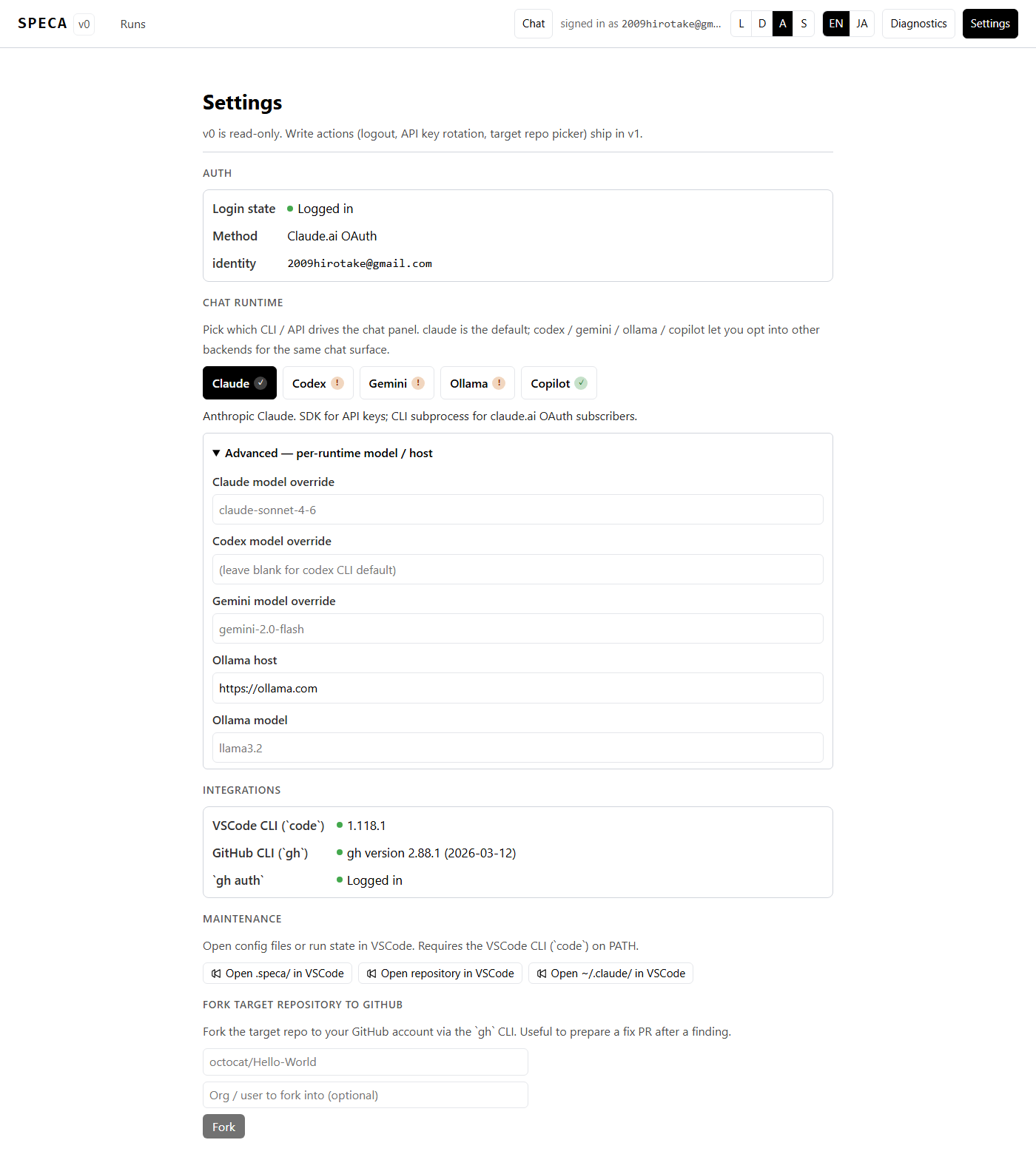
/settings ページの Chat runtime セクションで切替えます:
- 5 つのボタン (Claude / Codex / Gemini / Ollama / Copilot) と availability badge (
✓/!) - 選択中 runtime の状態 hint (CLI 未導入 / login 必要 / 鍵未設定 / 利用可能 等を一言で)
- Advanced — per-runtime model / host 折り畳みで model 上書き + Ollama host を編集
- 設定は
~/.speca/runtime.jsonに永続化 (秘密情報は入りません)
API キー (OLLAMA_API_KEY / OPENAI_API_KEY / GEMINI_API_KEY) はサーバプロセスの環境変数から読みます — Settings ファイルには保存しないので、共有マシンでも安全です。
既知の制限
- Phase 02c (MCP tree-sitter) — 現状
clauderuntime だけが MCP server (mcp__tree_sitter__*) を起動できます。codex/gemini/ollamaで Phase 02c を回すと code pre-resolution の精度が落ちます。回避策:--phase 01a 01b 01e 03 04のように 02c をスキップ- 02c だけ
--runtime claude、残りを別 runtime で split run
- Audit 結果の再現性 — runtime ごとにモデルが違うので、同一 commit でも findings の量・質は変動します。比較ベンチは benchmark スイート (
benchmarks/) で別途取得してください。 - Cost tracker — APIRunner 系は OpenAI 互換 response の
usageから計算しますが、self-hosted Ollama はtotal_cost_usd = 0になります (ローカル推論なので)。 - Copilot の MCP 対応 — Phase 02c の MCP tree-sitter は claude 専用なので、Copilot で 02c を回すと code pre-resolution 精度が落ちます (codex/gemini/ollama と同じ制限)。02c だけ
--runtime claudeで split run、または--phase 01a 01b 01e 03 04で 02c スキップが回避策。